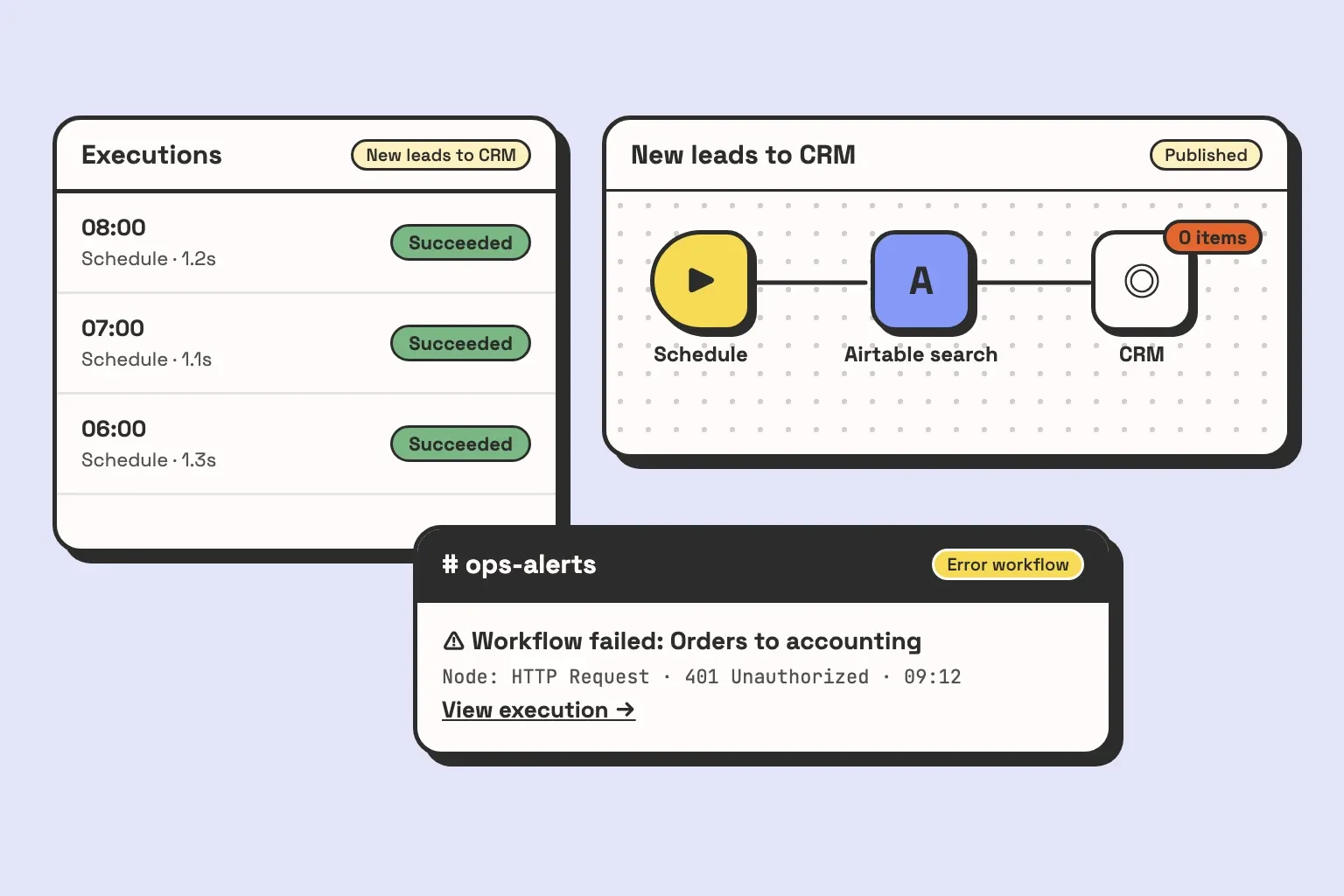
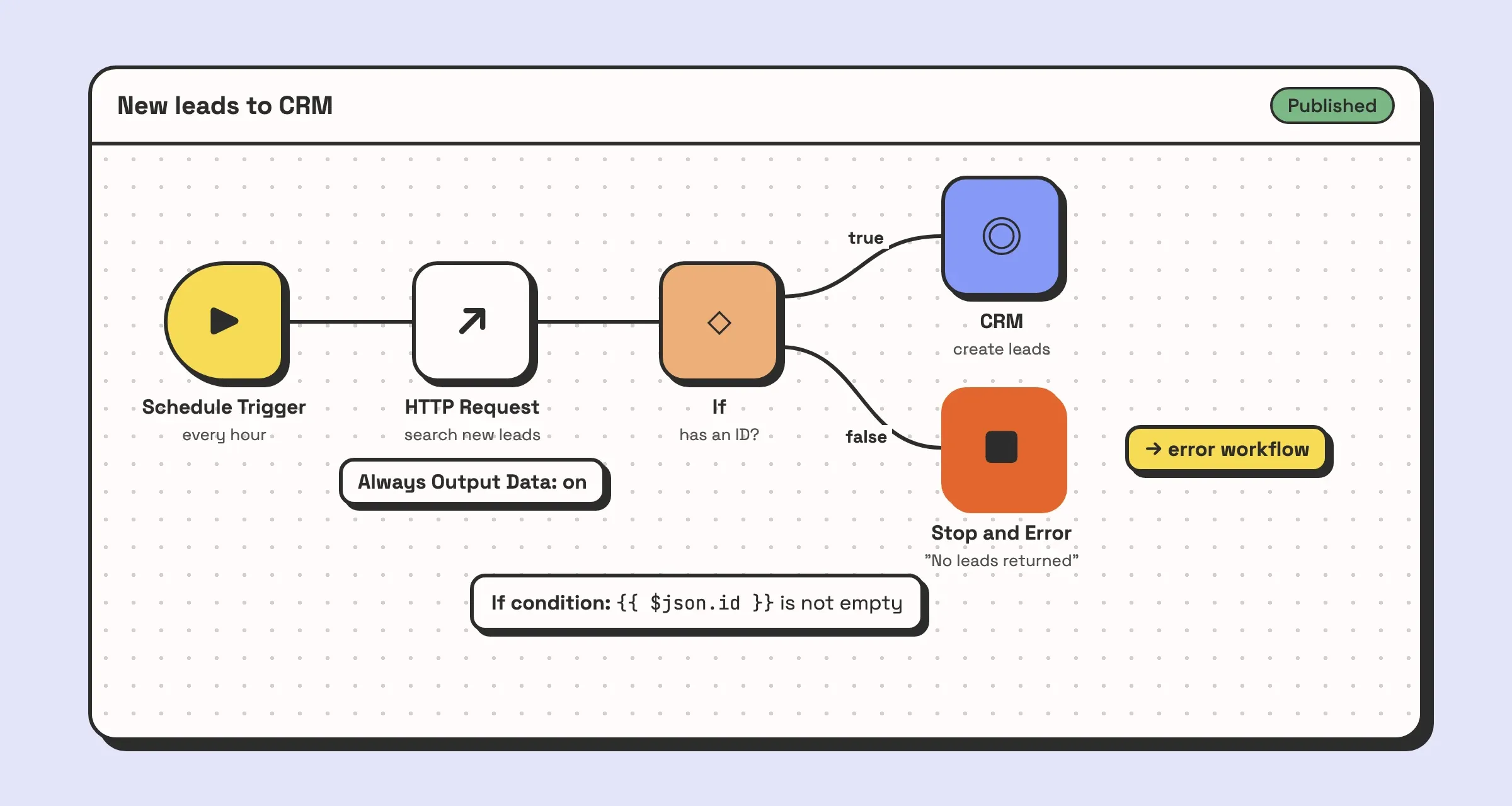
Every execution in the list is green. The workflow ran at 06:00, 07:00 and 08:00, and each run says Succeeded. The CRM still has no new leads since Tuesday, because a vendor renamed a status and the search node has been returning an empty list ever since. An empty list is a valid answer, so n8n never saw anything wrong. Most n8n reviews skip this kind of failure, and it is the one that costs money.
This n8n review is written from the other side of the trial. We are an automation agency, and we build and run n8n workflows for clients. Below is what holds up, the four things that go wrong in production and what each takes to fix, what running it takes each month, and who should pick something else.
n8n review: the short verdict
n8n is the tool we reach for when a process crosses several systems, needs to branch, or needs an API call no built-in node covers. It handles sequence well: fetch this, check that, branch, write back. It is cheaper than Zapier once workflows get long, and self-hosting it keeps every credential and every record on a server you control.
It is also unforgiving by default. A fresh workflow has no error workflow, so failures alert nobody. A self-hosted instance is a service you now run, upgrades included. Out of the box it suits a team with someone technical who owns it. Without that person, use the cloud plan, a simpler tool, or a partner who owns it for you.
What n8n is genuinely better at
Code when the canvas runs out
Every no-code tool eventually hits a step it does not have a button for. In n8n you drop in a Code node and write the step in JavaScript or Python, or call the vendor’s API directly with an HTTP Request node. That is normal on real builds. A built-in node covers the common operations, and as soon as you need one it does not expose, you write the request yourself and reference a stored credential for the auth.
The browser extension we built for product capture is a good example. It clips a product (vendor, price, image, specs) from any supplier page into Airtable, with n8n in the middle. Every vendor marks up a price differently, so the real work was a normalisation step that decides what counts as the price when a page shows three, and refuses to write a blank into a project budget when none of them parse. That step is code, and n8n lets it sit in the middle of the workflow alongside the visual nodes.
Control over where it runs
You can run n8n on n8n’s cloud or on your own server. Self-hosting means the workflows, the execution data and every connected app’s credentials stay on infrastructure you control. For a client whose data cannot leave their own environment, that settles the question before price comes up.
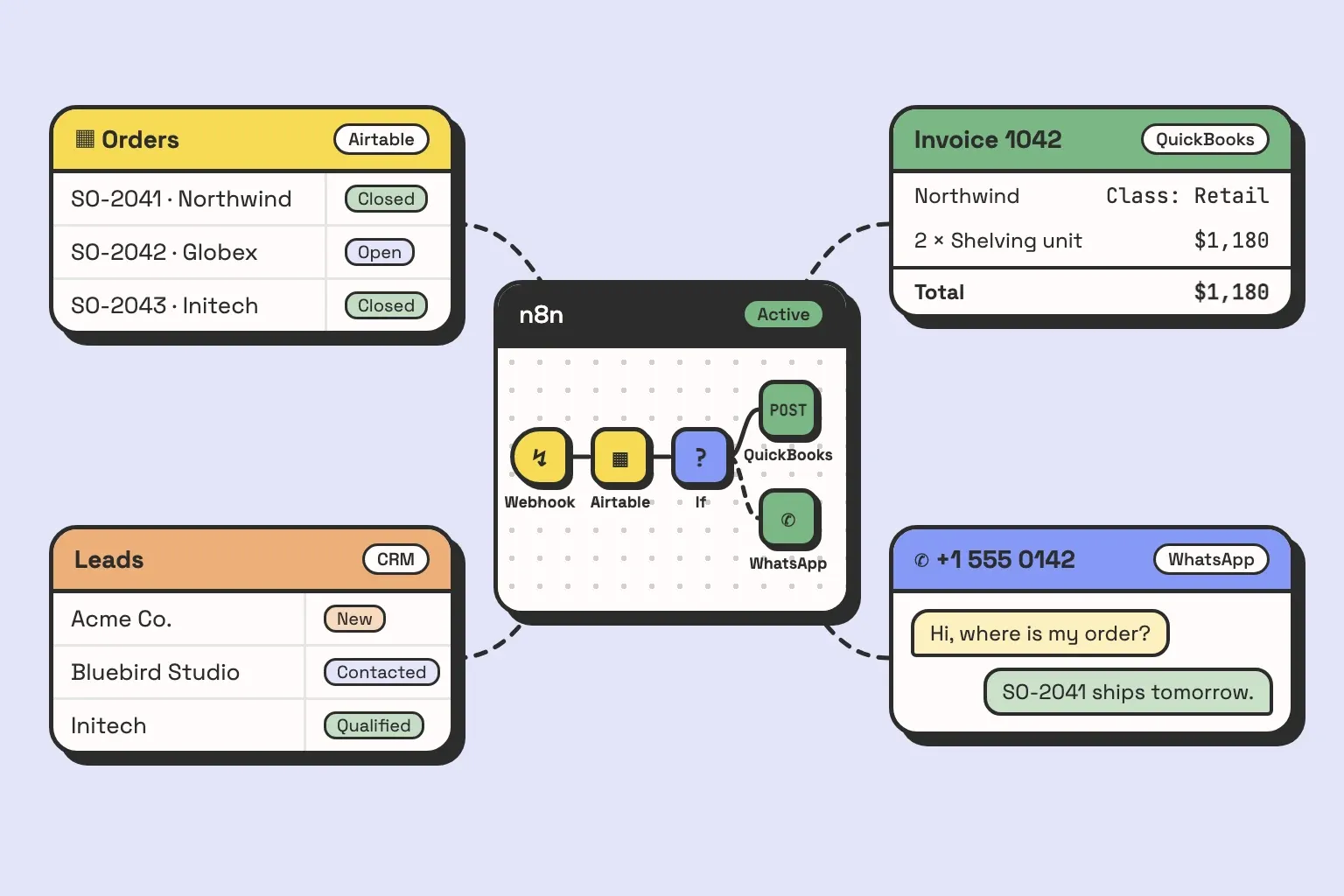
It also decides the order of operations. Our WhatsApp agent answers customers from Airtable, and n8n verifies who the sender is before Claude writes a word. An assistant that reads an order status to whoever happens to message is a data leak. n8n runs that sequence in the same order on every message.
Cost when workflows get long
n8n’s cloud plans are priced on executions, and n8n defines an execution as “a single run of your entire workflow”, however many steps it has. A 20 node workflow costs the same per run as a 2 node one. Zapier bills by task, and a task is counted for each action step that runs, so a long Zap multiplies its own cost on every trigger.
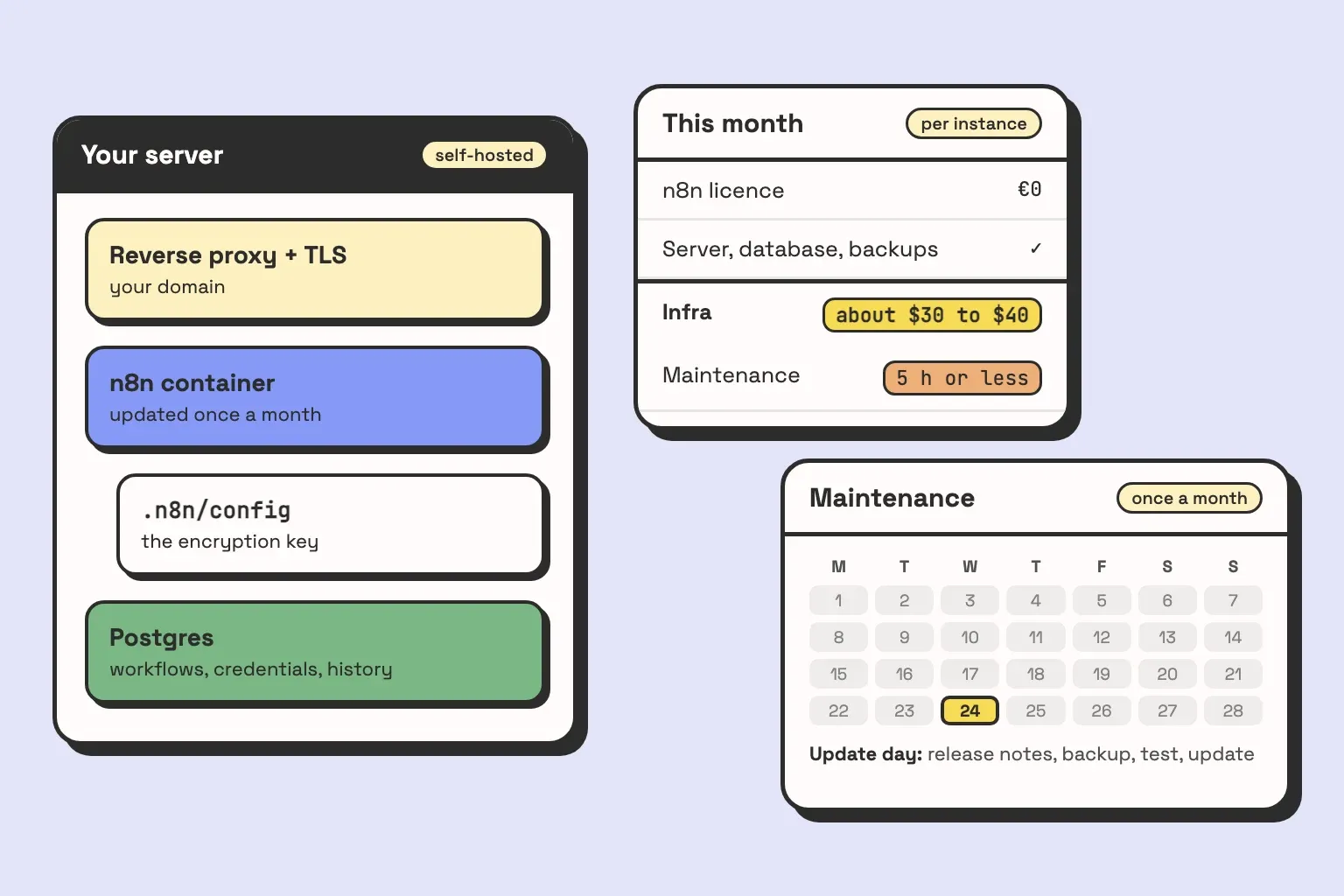
For short, high volume jobs the gap is small. For the workflows we usually build, which spend more nodes translating IDs and statuses between systems than on the task itself, it is the difference that makes n8n the cheaper option. The self-hosted Community Edition has no licence fee at all. The server still costs money: on DigitalOcean it usually runs about $30 to $40 a month, in the same range as an n8n Cloud subscription. Someone’s time comes on top of that.
What goes wrong in production, and what it costs to fix
These are the four that come up when we take over or look after an instance. Each has a known fix, and most of the fixes are settings or habits nobody put in place.
1. Failures nobody hears about
A new workflow has no error workflow selected. When a node fails, the execution is marked as failed in the executions list, and that is all. Nobody is told. The first signal is someone asking where their order went.
The fix is a separate workflow that starts with an Error Trigger node, selected in the settings of every production workflow under Error Workflow. When a run fails, the Error Trigger receives the workflow name, the last node that ran, the error message and a link to the execution, and you send that to Slack or email. One error workflow can serve all of your workflows. The basic version is two nodes, and turning it on is one setting per workflow.
That covers the loud failures. Two quieter ones get past it:
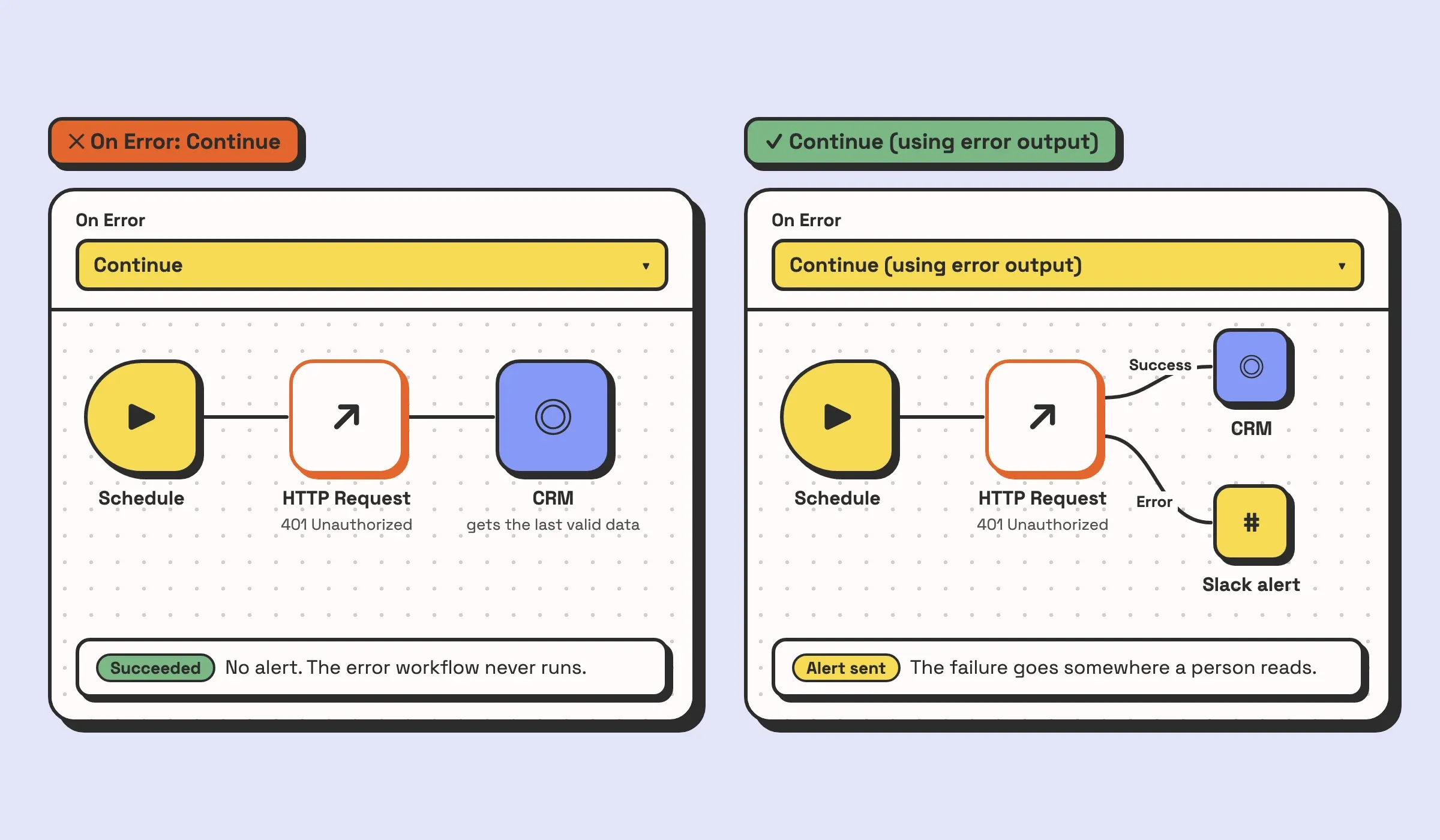
- A node set to Continue. Each node has an On Error setting. With Continue, a failing node passes the last valid data to the next node and the run carries on, so the execution finishes as a success and the error workflow never fires. It is easy to set this during testing, so one flaky call stops halting your test runs, and then forget it is there. Use Continue (using error output) instead, which gives the node a second output for failures, and route that output somewhere a human will see it.
- A run that succeeds with nothing in it. The scene at the top of this page. The API answered, the answer was empty, and nothing in the workflow treats empty as a problem. Worse, a node that outputs no items ends its branch, so the nodes after it never run and there is nothing to check. The fix has two parts on any lookup that should never come back empty. Turn on Always Output Data in the lookup node’s settings, so an empty answer still produces one empty item. Then add an If node that tests a field every real record has, such as its ID, with a Stop and Error node on the false branch. Stop and Error fails the execution on purpose, which hands it to the error workflow like any other failure.
One more setting matters here. The link to the failed execution only exists if n8n saved the execution, and each workflow can be set not to save failed production runs. Leave Save failed production executions on.
2. Upgrades that change behaviour
n8n releases quickly. Its release notes show a new minor version roughly every week, and it follows semantic versioning, so a major version is where incompatible changes land. The 2.0 release is a good list of what that means in practice:
- The active toggle became Publish. Edits to a published workflow no longer go live until you publish them again.
- Code nodes run in task runners by default, and access to environment variables from inside a Code node is blocked unless you turn it back on.
- The Execute Command and Local File Trigger nodes are disabled by default.
- When a sub-workflow resumes from a wait (a webhook, a form, a human approval), the parent now receives the child’s output rather than its input.
- MySQL and MariaDB are no longer supported as n8n’s own database.
Each of those is a reasonable change. Each one can also break a workflow that relied on the old behaviour, and not always loudly. A parent that expected the child’s input gets different data and writes it somewhere.
On self-hosted n8n, pin the version you run rather than following the newest image. Read the release notes before you move. Upgrade a copy of the instance first, run the production workflows against test accounts, and only then upgrade the real one. On n8n’s cloud plan less of the upgrade work is yours, but a behaviour change still reaches your workflows, so the reading and the test run still apply.
3. Credentials that stop working
Workflows outlive the logins they run on. The common versions:
- Personal accounts. The Gmail or HubSpot connection was made with an employee’s own login. They leave, IT deactivates the account, and every node using that credential can start failing that day.
- Google apps left in Testing. If you create your own Google OAuth app as External and leave it in Testing mode, n8n’s documentation says consent and tokens expire after seven days. The workflow works through the first week of testing and stops on day eight.
- Keys pasted into nodes. An API key typed into an HTTP Request header works, and rotating it means finding every node it was pasted into.
With an error workflow in place, an expired credential at least fails loudly. The fix is to make every connection on an account the company owns, store every key in n8n’s credential store and reference it by name, and keep a list of which credential each workflow depends on and who owns it.
4. Someone changes the Airtable base
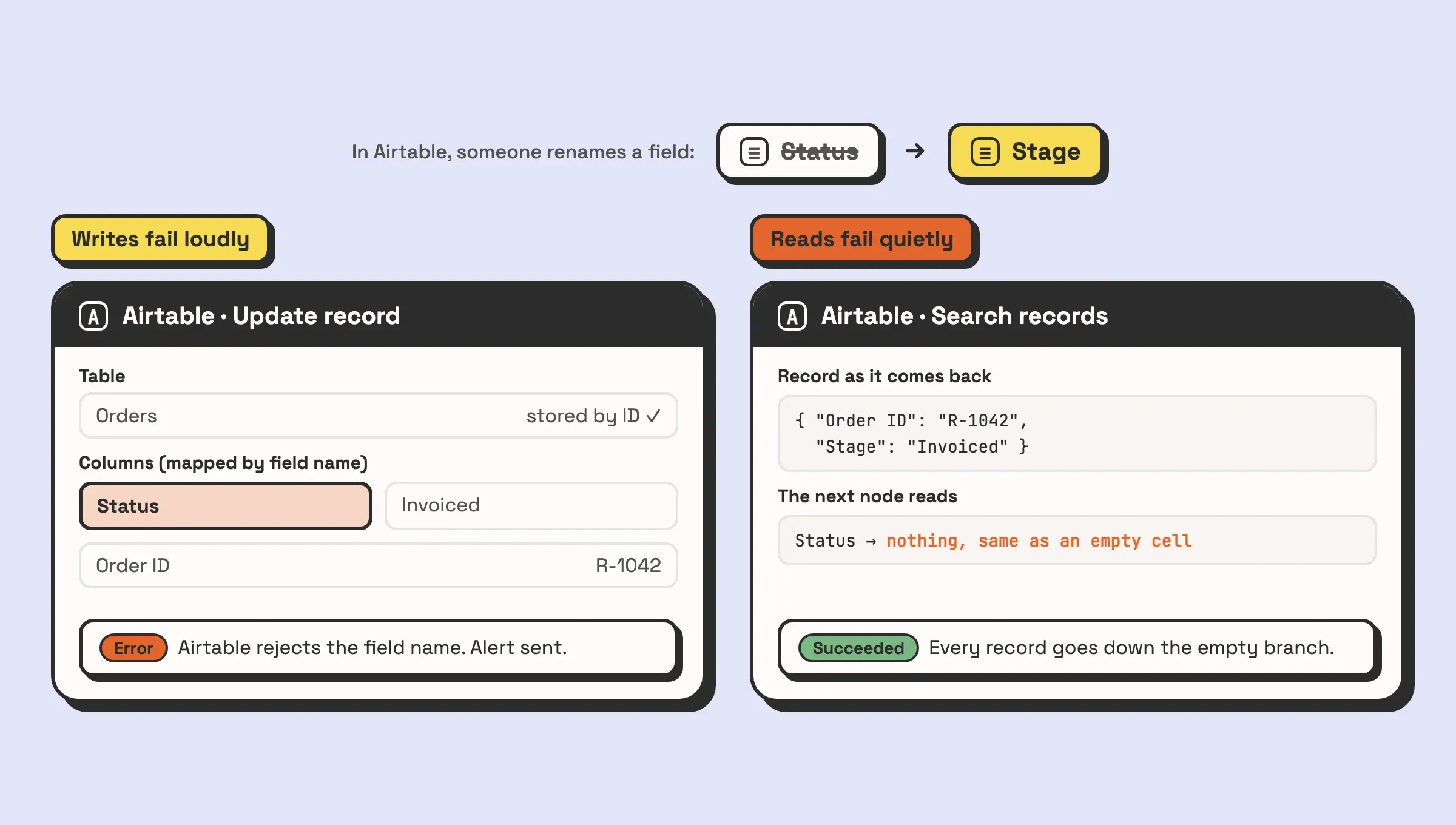
This is the one we actually run into on client builds. Nothing is wrong with n8n or with the workflow. Someone on the client’s team renames a field from “Status” to “Stage”, turns a text field into a single select, or tidies up the options in a dropdown, and the workflow that reads or writes that base breaks.
How it breaks depends on what the workflow does with the field. When you pick the base and the table from the list in n8n’s Airtable node, it stores their IDs, so renaming a table does not break anything. Fields are different. The column mapping in a create or update operation works by field name, so after a rename the next write sends a name the table no longer has, Airtable rejects it, and the run fails. A changed field type or a deleted select option fails the same way on writes, because the value no longer fits the field. Each Airtable field type stores its value differently, so switching text to single select is a schema change even though the column looks the same.
Reads fail quietly. Airtable returns each record’s fields keyed by name and leaves empty fields out of the response. An expression that still reads the old name gets nothing back, which looks exactly like an empty cell. An If node sends every record down the “empty” branch, or a blank gets copied into the next system, and the execution says Succeeded.
The fixes, in the order we would apply them:
- The error workflow from the first failure catches the writes that fail loudly.
- A guard on the reads. After the Airtable node, check that the fields the workflow depends on are present on records that must have them, and send anything else to a Stop and Error node. It is the same pattern as the empty result guard above.
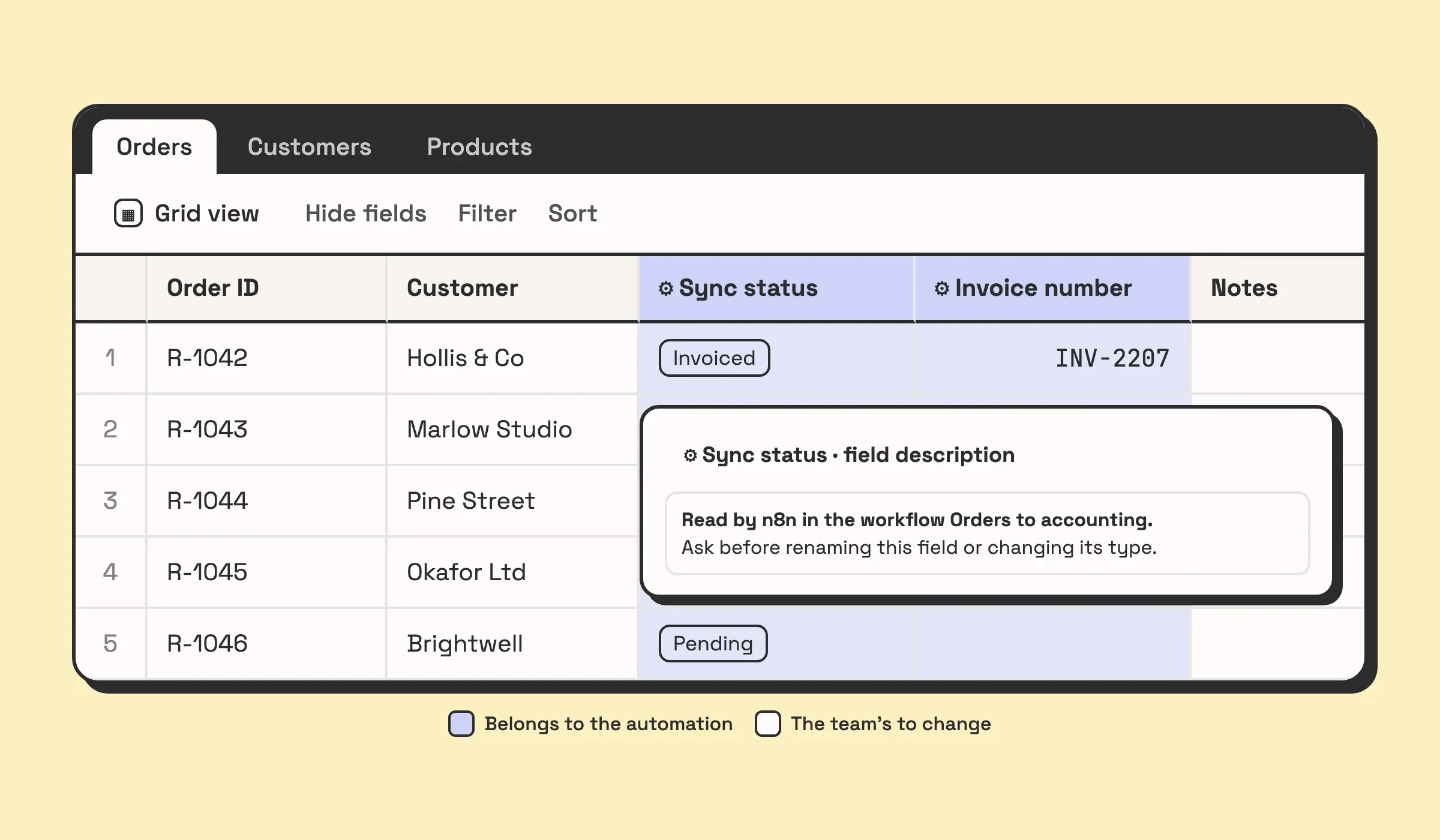
- Agree which fields belong to the automation. Make it visible in the base: a prefix on those field names, a line in the field description saying which workflow reads it, or a section of the base the team knows to leave alone. A rename then becomes a question before it happens.
- Field IDs where it matters most. Airtable’s API accepts field IDs in place of names, and an ID survives a rename. The Airtable node’s column mapping uses names, so this means calling the API with an HTTP Request node for the steps a rename must not break.
If you have a set of n8n workflows that nobody has looked at since launch, that is a good use of a call. Book one and we will tell you which of these four you have. If your workflows are three nodes each and only touch internal tools, you probably do not need us for it.
One more, on self-hosted instances: memory
Big runs can stop an instance. n8n’s documentation lists what drives memory use: the amount of JSON and binary data, the number of nodes, Code nodes in particular, manual runs (which copy the data to the editor), and other workflows running at the same time. The symptom is an execution stopped mid-node with a note that n8n may have run out of memory, or “JavaScript heap out of memory” in the server logs.
The fix is structural. Process records in batches with Loop Over Items, hand each batch to a sub-workflow so only that batch sits in memory, and return a small result to the parent. Giving the server more memory also helps, and on its own it buys time until the data grows again.
Maintenance: what running it actually takes per month
Our estimate for a client instance is usually around 5 hours a month or less. It depends on the workflows: how many there are and how many outside systems they touch. The jobs themselves are the same on any instance:
- Read the alerts. Every message from the error workflow gets an answer: a retry, a fix, or a note that it was expected.
- Check the runs that should have done something. The quiet failures above are the reason. A daily look at whether the key workflows wrote what they should have written catches what alerts miss.
- Upgrade on purpose. Read the release notes, test on a copy, then move. On a self-hosted instance this is the biggest recurring job.
- Keep the run history you will need. A self-hosted instance prunes execution data older than 336 hours (14 days) by default. If someone may ask in March whether a January invoice went out, write a line per important run to a table you keep, such as an Airtable base.
- Back up and test the restore. The workflows and the encrypted credentials live in n8n’s database. An untested backup is a guess.
- Know when the base changes. A renamed field breaks the workflow that reads it, so changes to the fields an automation depends on go past whoever looks after the workflows first.
- Watch the credentials. Rotate keys when people leave and renew anything with a fixed expiry before it lapses.
- Keep the server up, if you self-host. When the instance is down, incoming webhooks get no answer. Some senders retry later and some never send that event again.
On n8n’s cloud plan the server, the database and the backups are n8n’s job, which takes the backup and server items off your list. The rest stay with you on any plan.
Who should not use n8n
Five cases where we would point you elsewhere:
- Your workflows are two steps. New form entry, post to Slack. Zapier or a template does it in minutes, and you will spend longer setting up n8n than the job is worth.
- Nobody would own it. If no one on your team can open a failed execution and read the error, and you do not want to pay someone who can, you will not use most of what n8n offers. A simpler tool with fewer ways to break fits better.
- You want to self-host to save money and nobody runs servers. The Community Edition has no licence fee. The server, the backups, the upgrades and the monitoring are still work, and that work is now yours.
- The process is not settled. Automating a process your team still argues about hard codes the argument. Settle it first.
- Your whole process lives in one Airtable base. Airtable’s own automations handle work that starts and ends inside one base. Reach for n8n when the work leaves it.
Scorecard
| Verdict | Why | |
|---|---|---|
| Flexibility | Strong | Code nodes and direct API calls cover whatever the built-in nodes do not |
| Cost on long workflows | Strong | One run is one execution, however many steps it has |
| Control over data | Strong | Self-host and nothing leaves your infrastructure |
| Failure handling | Weak by default, strong once set up | Error workflows, error outputs and Stop and Error are all there. None is on by default |
| Upgrades | Mixed | Fast releases and good release notes, with behaviour changes you have to test for |
| Learning curve | Steep for non-technical teams | Expressions and JSON data turn up early |
| Running it yourself | Real work | Server, backups, upgrades and monitoring, every month |
If you are hiring someone to build or take over your workflows, what to ask an n8n developer turns the failures above into six screening questions. If you are deciding whether to bring in an agency at all, what an n8n agency actually does covers that. And if you are still choosing a platform, our comparison of Zapier, Make and n8n covers where each one fits.