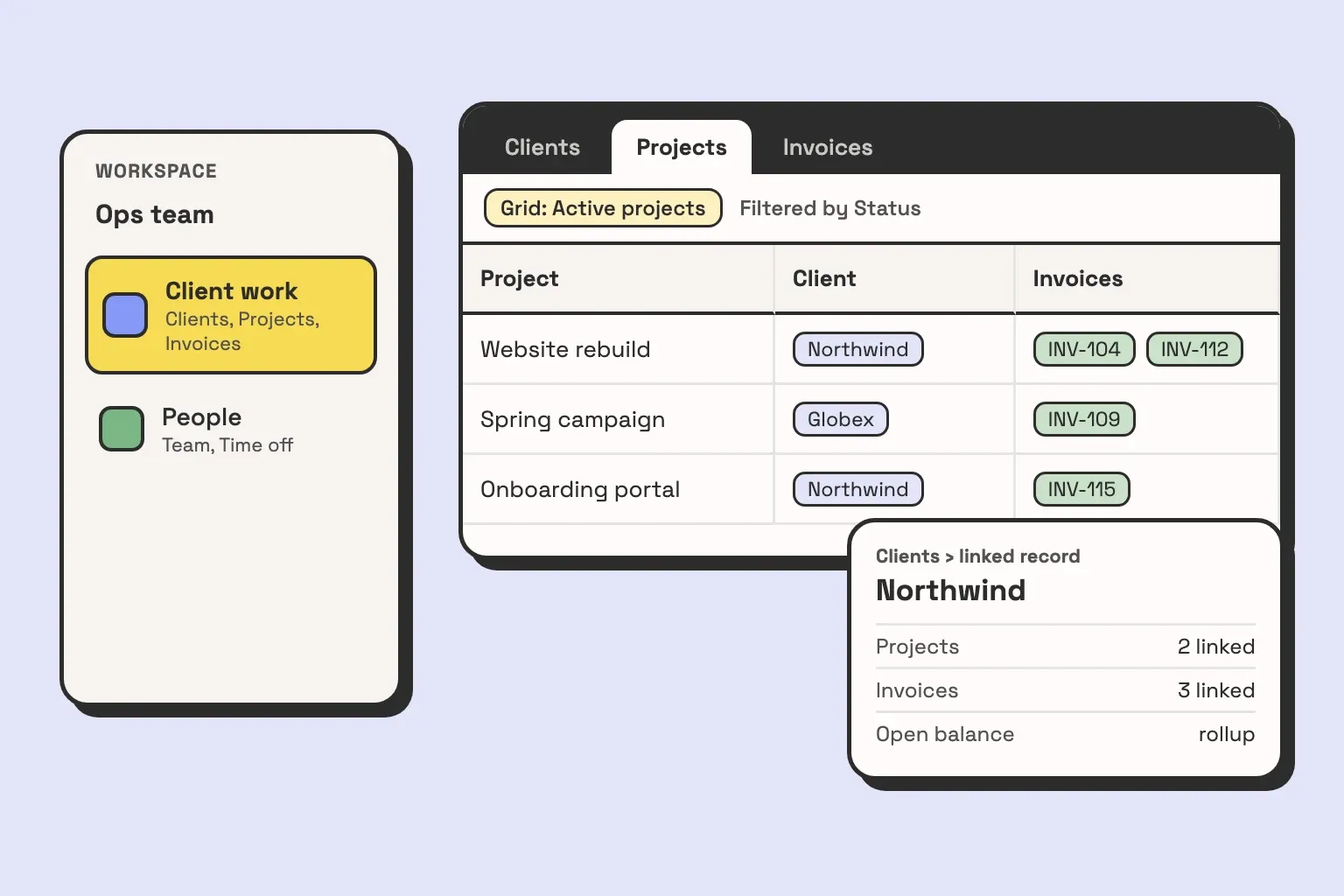
You sign up, create a base called Clients, and add a few rows. A week later you need to track projects, so you create a second base called Projects. Then a third for invoices. Each one works on its own. The trouble starts the first time you want an invoice to point at the project it bills, and you find out it can’t, because they live in different bases.
So, what is a base in Airtable? It is one database: a set of tables whose records can link to each other. That boundary is the whole reason the “one base or several” question matters, and it is the decision that is most expensive to undo later. Below is what each Airtable term means, then the rule we use with clients to decide where a new table goes.
What a base in Airtable is
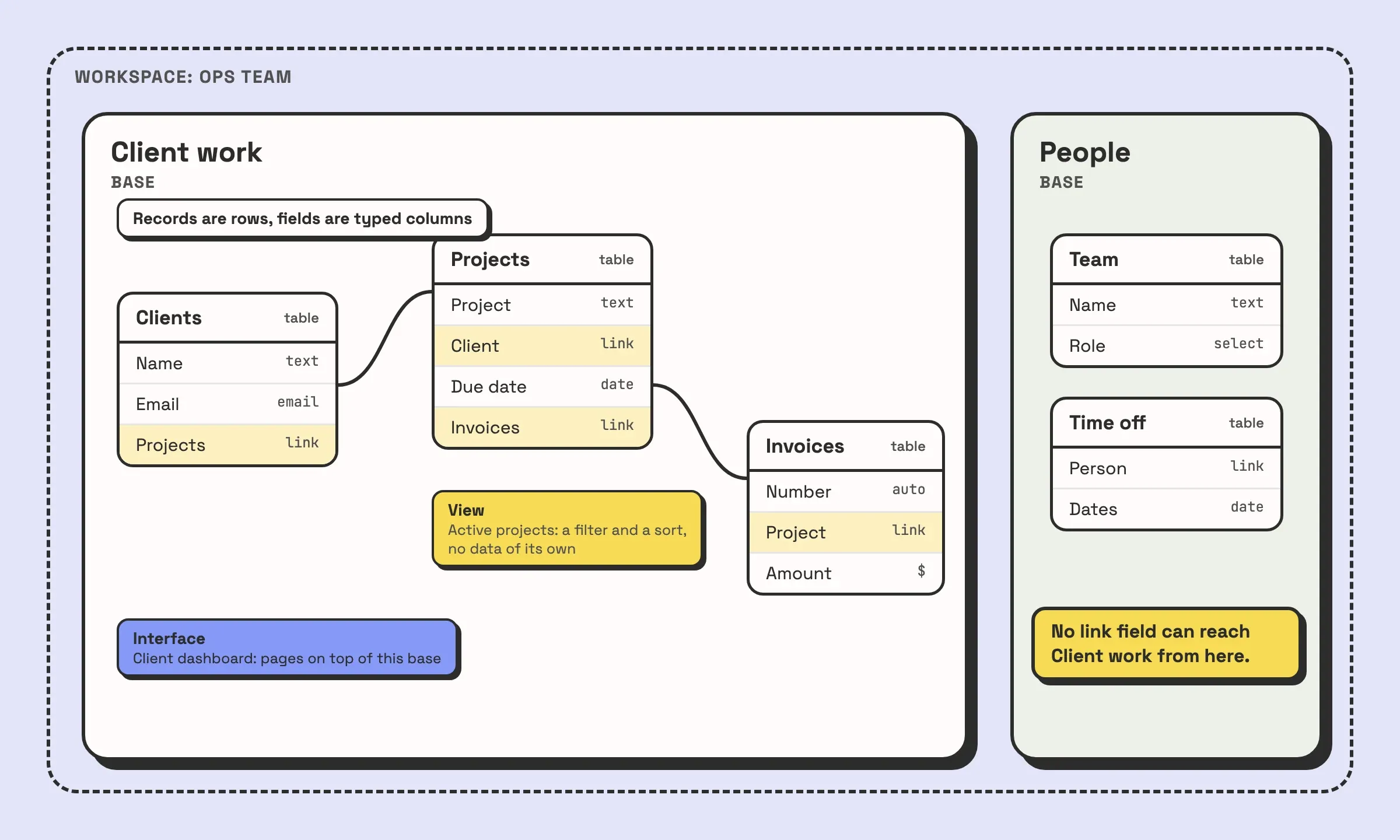
A base is the Airtable equivalent of one database. It holds tables, the tables hold records, and a linked record field lets a record in one table point at records in another. That last part only works inside a single base. Airtable does not let a linked record field point at a table in a different base, so two bases are two separate databases that know nothing about each other unless you copy data between them.
If you come from spreadsheets, a base looks like a workbook and its tables look like tabs. The difference is the links. In a workbook, the Invoices tab can look up a client by name with a formula that breaks when someone fixes a typo. In a base, the invoice links to the client record itself, and renaming the client changes nothing about the link. If that idea is new, our explainer on what a relational database is covers it with examples.
Workspace, base, table, record, field, view, interface
These seven words cover almost everything you will click on in Airtable. They nest, so the order matters.
| Term | What it is | Spreadsheet equivalent |
|---|---|---|
| Workspace | A folder of bases, with its own list of collaborators and its own billing plan | A shared Drive folder |
| Base | One database. Tables inside it can link to each other | A workbook |
| Table | One kind of thing: clients, projects, invoices | A tab |
| Record | One instance of that thing: one client, one invoice | A row |
| Field | One property of every record, with a type: date, number, link, attachment | A column, but typed |
| View | A saved way of looking at a table: its filters, sorting, hidden fields, grid or kanban | A filtered copy of a tab |
| Interface | Pages built on top of a base for people to do their part of the work | No equivalent |
A few of these trip people up.
A view does not hold data. Deleting a view deletes a filter and a layout, not a single record. When rows seem to vanish, the cause is usually a filter on the view.
A field has a type, and the type is a commitment. A text field that holds dates cannot be sorted by date or used in a date formula. Our guide to Airtable field types goes through each one.
An interface belongs to one base. Each of its pages is connected to a table in that base, so an interface cannot show data from two bases side by side.
Workspace or base: a workspace is about who pays and who can see. Someone added to a workspace can open every base in it. Someone added to a single base sees only that base. Neither one changes how the data links.
One base or several? The rule
This is the rule we use with clients:
One base per set of data that links together. A new base only when the people, or what they are allowed to see, are different.
In practice that comes down to two questions you ask about any new table.
- Will a record in this table ever need to point at a record in an existing table? An invoice points at a client. A task points at a project. A shipment points at an order. If the answer is yes, even “probably, one day”, the table goes in the same base. You cannot add the link later without moving the table, and moving a table into another base means copying its records across and rebuilding its field types, links, views and automations by hand.
- Is there someone who should use this base but must never see this table? Base access shows a person every table in the base. Salaries, performance notes and anything a client must not see are the usual examples. If the answer is yes, that is a reason to split.
Before splitting for the second reason, check whether an interface solves it. On paid plans, Airtable lets you share an interface with someone without giving them access to the base, so they see only the pages and fields you put in front of them. A field manager who needs to update jobs but must not see margins can have that without a second base. When the people who need to be kept apart also need to edit the same data, interface-only access is usually the cleaner fix, and we cover how to build those pages in our post on Airtable interface examples.
If you are about to split a base and want a second opinion on where the line goes, book a call and bring the base.
The mistake we fix most often: a base per client
The base we inherit most often was built one of two ways: one base per client, or one base per year.
The base per client starts sensibly. Someone builds a good base for the first client, then duplicates it for the second. At three clients it is fine. Around the tenth, the copies have drifted. A field added to one base for a new kind of deliverable is missing from the others. An automation was fixed in four of them. And the first time someone asks “how many hours did we bill across all clients last month”, the answer involves an export from every base and a spreadsheet.
The base per year has the same shape on a different axis. Orders 2024 and Orders 2025 are separate bases, so a customer who ordered in both years exists twice, and their history is split down the middle. Nothing in 2025 can link to a 2024 record.
The usual repair attempt is sync. Someone builds a reporting base and syncs a table from each client base into it. It works, with costs that pile up:
- Every source base needs a shared view enabled for syncing, and every new client means a new sync to set up by hand.
- A one-way sync is read only in the destination: you cannot add or delete records there or edit the synced fields. Fixes still have to be made in each client base.
- Linked record fields arrive as plain text unless the linked tables are synced as well, so the reporting base cannot group invoices by project without more syncs.
- The client bases keep drifting apart underneath, so the syncs need checking every time one of them changes.
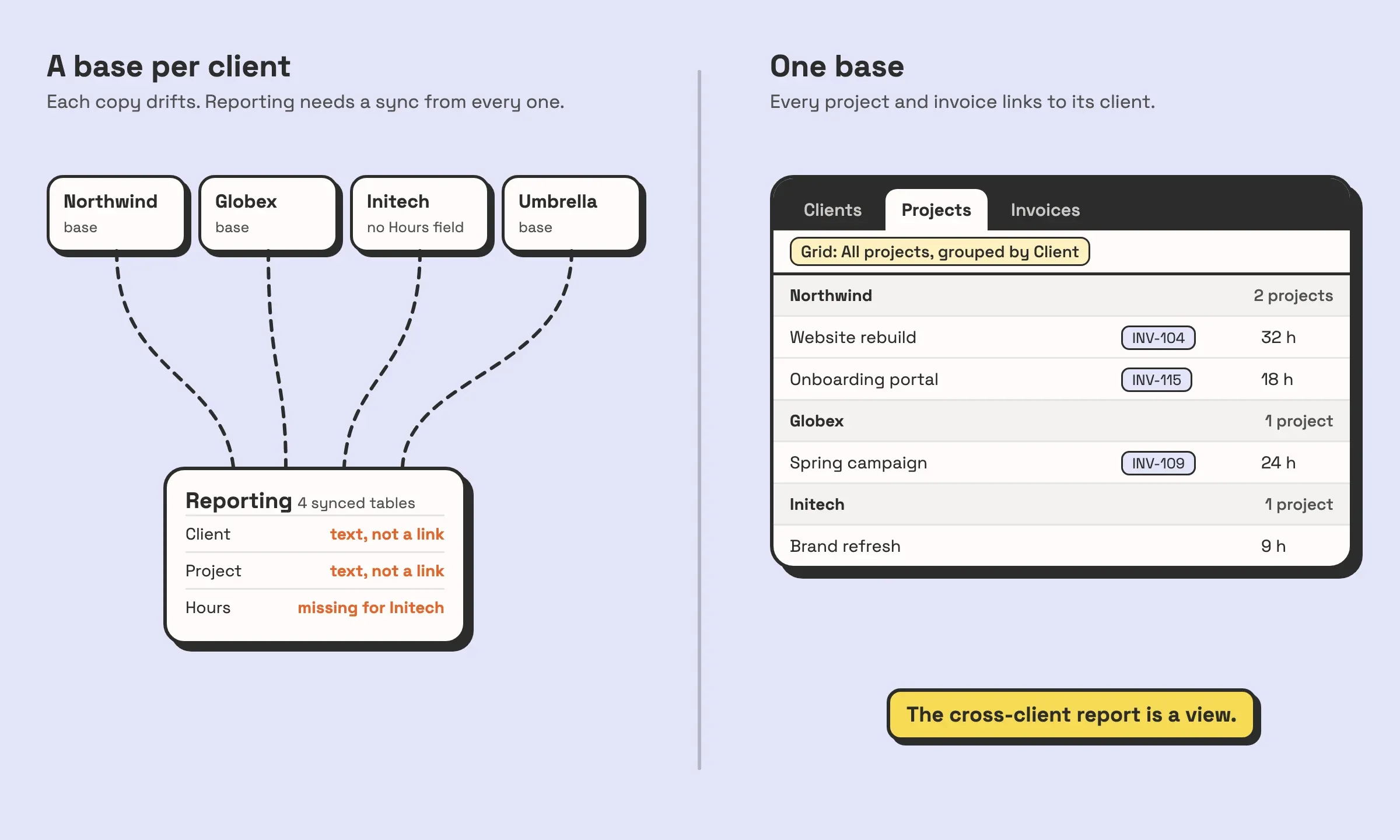
The fix is almost always to merge: one base, a Clients table, and every project, task and invoice linked to its client. A filter on a view, or a page in an interface, then shows one client’s work. Cross-client reporting becomes a view instead of a project. The cost is the migration itself. The usual order is: build the merged base from the most complete copy, add a Client link field to every table that was split by client, import each old base’s records and fill that link as they come in, then rebuild the automations and interfaces once, in one place, instead of once per base. For a base with years of history that is real work, and occasionally the answer is to leave the old bases read only and start the merged base from today.
When splitting is right, and syncing between bases
The rule does say split sometimes. These are the cases where we do.
Different people, with no overlap in what they need. HR records and client delivery rarely link, and the people who see one should not see the other. Two bases, in workspaces with different collaborators if the separation matters.
An external audience. When clients, contractors or partners need to log in and edit data, the safest setup is often a base that holds only what they are allowed to touch, fed from the main base.
A process nothing else links to. A content calendar that never references a client or a project can live on its own without costing anything. If it starts linking, move it in.
Size. Each Airtable plan caps the number of records per base. When a base nears that cap, archiving old records to a separate base is a legitimate split. Check the current limit for your plan on Airtable’s pricing page, since it changes.
When you do split, keep one base as the owner of each shared list and sync it outward. A team directory that lives in the People base and syncs one way into Client work is fine. The source base is the only place it is edited, base-to-base syncs set to update automatically arrive in real time, and the destination can link its own records to the synced records. Sync is not available on the Free plan, and two-way sync, where the destination can edit the source, is limited to the Business and Enterprise Scale plans.
If you find yourself wanting two-way sync on several tables between the same two bases, those tables belong in one base. Sync is for sharing a reference list across a boundary you chose on purpose. It is a poor substitute for a linked record field. The design side of that choice is covered in our database design best practices.
Before you create your next base, ask the first question: will anything in it need to link to what you already have? If it will, make it a table.


